Understand and Create Custom OptionSet in Swift
Step by step guide for creating custom OptionSet
Team Lead - iOS who loves building mobile applications. Dynamic and passionate individual with extensive experience in application development lifecycle from concept through delivery of next-generation applications and customisable solutions in an Agile Environment.
With nearly eight years of development experience, three years of project management, I have a track record of working with top clients and building their business ideas. Continuous learner always looking for an enriching and strengthening my technical and professional skill set.
Expertise:
- iOS Application Development [Swift | Objective-C]
- Project Management
- Payment Gateway Integration [PayU, Razorpay, Ingenico, PayFort]
- Agile Development
- Postman for API Testing
- Unit Testing
- Design Patterns [MVC | MVVM | VIPER ]
- Version Control [GIT | SVN]
- Functional Programming
Find me Online:
- Medium: https://milanpanchal24.medium.com/
- Twitter: https://twitter.com/milan_panchal24
- HackerRank: https://www.hackerrank.com/milanpanchal?hr_r=1
- StackOverflow: https://stackoverflow.com/users/1748956/milanpanchal
- Github: https://github.com/milanpanchal
In this article, we will learn what is OptionSet in Swift and how to create your own custom OptionSet.
What is OptionSet?
- In Swift,
OptionSetis a protocol to represent bitset types, where individual bits represent members of a set. OptionSetis similar toenum, but they are designed to work as a set so we can use multiple values at the same time.- As
OptionSetconfirms toSetAlgebraprotocol, we can use methods likeintersection,union,contains,isDisjoint, and several other methods that you might have used onSet.
As a matter of fact, Swift’s OptionSet protocol is the bridged version of Objective-C's NS_OPTIONS enum.
According to the documentation, there are over 300 types in Apple SDKs that conform to OptionSet
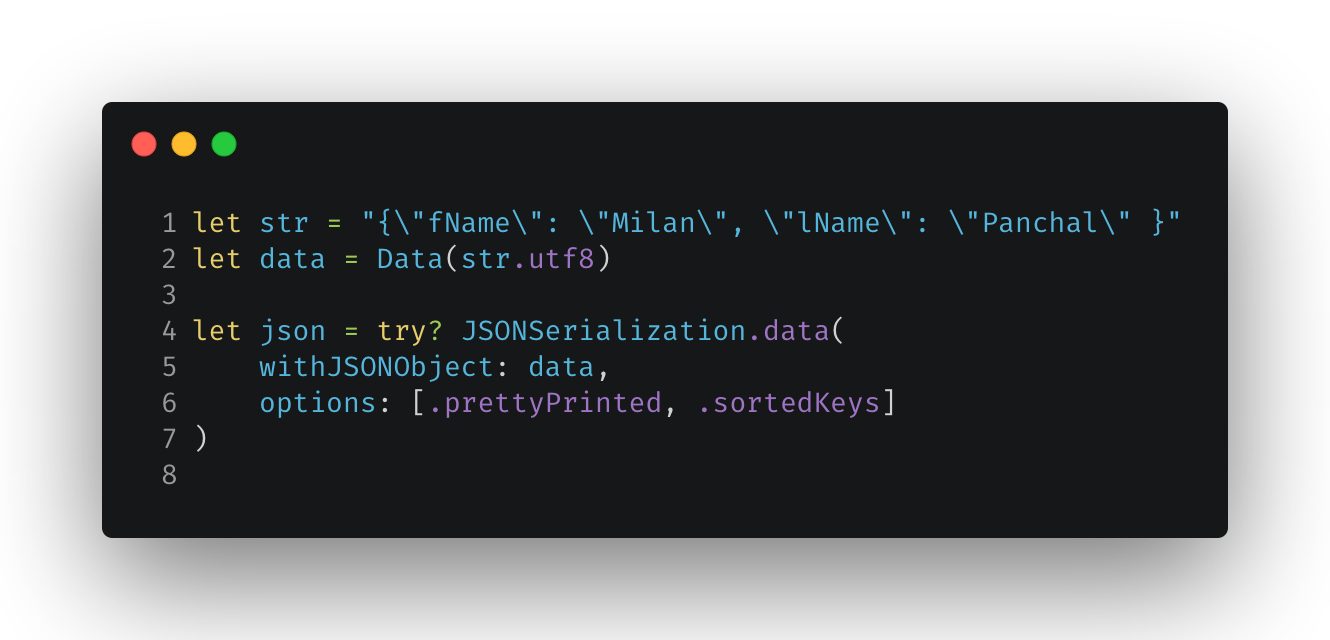
For example, to parse JSON string using JSONSerialization we can provide .prettyPrinted and .sortedKeys as options for the final JSON.
Creating a custom OptionSet type:
Creating our own custom OptionSet is very straightforward. To do this,
Declare a new struct that conforms to the
OptionSetprotocol.Define
rawValueinstance property which must be of a type that conforms to theFixedWidthIntegerprotocol — it’s normally,IntorUInt8.Next, create static instances of your struct for all options, where each option should have unique raw value that’s a power of two (1, 2, 4, 8, and so forth) — It’s common to use bit-shifting
(<<)operator to avoid mistakes.Add one or more of those instances as new statics.
To demonstrate this, let’s create a UserAccess struct that defines different level of access of the users like read, write, modify, etc.
All those options need unique raw values, so we’re going to use left bit shifting — 1 << 0, 1 << 1, and so on to avoid mistakes. We can also specify named aliases for specific combinations of values.
Here’s how it looks in Swift:
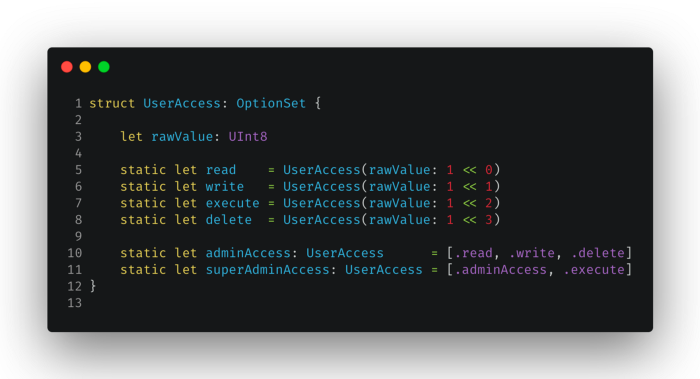
NOTE: In the above example, we have used UInt8 which uses 8 bits for its storage. Hence we can define max 8 unique options. You may use UInt16 in case you have more options.
Using an OptionSet type:
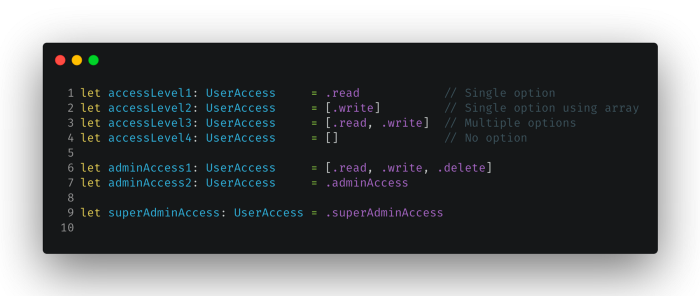
- To create an instance of an option set, assign one of the type’s static members to your variable.
- To create an instance of multiple option set, assign an array literal with multiple static members of the type’s.
- To create an empty instance, assign an empty array literal
([])to your variable.
Summary:
For now, we have learned what is OptionSet and how to create our own OptionSet. We also see that we can use OptionSet for storing a finite list of options as a single value instead of an array.
References:
- https://developer.apple.com/documentation/swift/optionset
- https://swiftdoc.org/v5.1/protocol/optionset/
You can find me on:
Twitter | Tooter | LinkedIn | GitHub | Medium | HackerRank | LeetCode | Stack Overflow